Key Takeaways
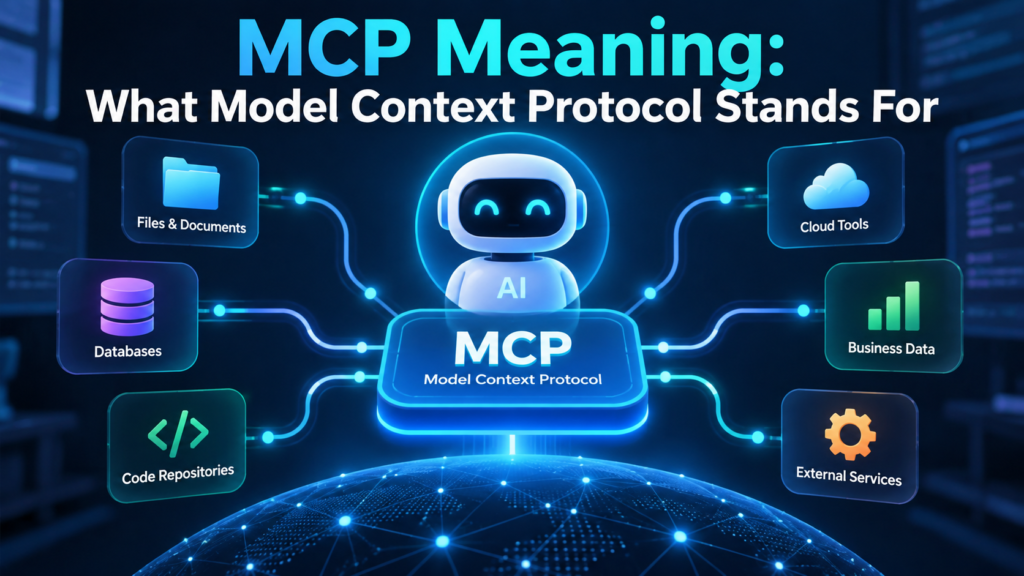
- MCP stands for Model Context Protocol.
- It gives AI applications a shared way to connect with outside tools, data, and services.
- Think of it as a single common plug for many apps, rather than a different custom cable for each connection.
- An MCP client is the AI application, while an MCP server exposes selected data, tools, or actions.
- MCP can support design research, coding, documentation, business data access, and controlled actions.
- It does not replace APIs, databases, or human review.
The Problem MCP Is Designed to Solve
AI assistants can write, summarize, analyze, and help with code, but their answers are limited when useful information sits inside another application. People often switch tabs, search manually, copy text, paste screenshots, and explain the same background again in every new conversation. That process is slow, and important context can be lost along the way.
For a practical design-focused explanation of what is MCP, Mobbin’s glossary describes how the protocol can bring external app data into AI tools. Mobbin is a design reference platform focused on real product interfaces and user flows, so its perspective is especially relevant for product teams using AI to research screens, patterns, onboarding experiences, and paywalls without repeatedly collecting visual examples by hand. For instance, an AI agent connected via MCP could pull design patterns or real app screens directly from Mobbin’s library, allowing designers to compare signup flows, paywall implementations, or navigation structures in context without manually searching and copying examples.
MCP Meaning, Explained Simply
MCP meaning is Model Context Protocol. It is an open protocol that defines a common way for AI applications to access useful context from connected systems.
- Model refers to an AI model or an assistant powered by one.
- Context refers to the information, tools, files, records, or services that help the assistant complete a task.
- A Protocol is a shared set of technical rules that allows different systems to communicate consistently.
Anthropic publicly introduced MCP on November 25, 2024, as an open standard for connecting AI assistants to where data lives, including business tools, development environments, and content repositories. The basic idea remains easy to understand even when the technical details become more advanced.
Think of MCP as One Plug for Many Apps
Without a common connection method, every AI tool and every outside service may need a custom integration. That can create a maze of separate connections. MCP meaning becomes clearer with an analogy: instead of a different custom cable for every connection, think of one universal plug that many apps can use. MCP offers a shared pattern instead: an AI application can use compatible services, and those services can expose their capabilities in a format AI applications understand.
For example, one assistant might be connected to a design library, a code repository, and an internal knowledge base. Each connected service can offer different capabilities, such as searching screens, retrieving project files, checking an issue, or reading a policy document. The assistant uses the connection that best fits the request.

The Two Main Parts of an MCP Connection
MCP client
The client is the AI application where a person types a prompt. It may be a chat interface, coding environment, or other AI-enabled workspace. The client sends requests and presents results to the user.
MCP server
The server is the service that makes selected capabilities available through MCP. “Server” does not have to mean a large physical machine. It can be a small application layer that safely exposes an app’s search, data, files, or approved actions.
How a Typical MCP Request Works
- A user asks the AI for help, such as finding examples of a signup flow or checking the status of a project issue.
- The AI client identifies a connected MCP server that may provide relevant information or a useful action.
- The server returns available results, such as screens, documents, records, or tool output.
- The AI uses that context to respond, recommend next steps, or complete an action if the user has approved the necessary access.
The important point is that MCP should expose only what is needed. A connection that can search a design library does not automatically need permission to edit a database, send a message, or delete a record.
Where MCP Can Help in Real Workflows
Designers can use MCP to request common onboarding patterns, compare how shipped products present subscriptions, or find examples of empty states and navigation structures. Instead of describing visual references from memory, an assistant can retrieve relevant examples from an approved design-reference connection and discuss them in the same working session.
Developers may use MCP to inspect documentation, find issues, review pull requests, search a repository, or run approved checks. Operations and business teams may use it to retrieve records, summarize current information, or prepare a report from systems they already use. Some connections are read-only, while others can perform actions, which makes permissions and review especially important.
MCP Compared With APIs, Plugins, and RAG
- API:An application programming interface allows software to request data or perform actions from another system. MCP may use underlying APIs, but it provides AI applications with a more consistent way to work with connected capabilities.
- Plugin:A plugin is typically built for a single platform. MCP is intended as a shared protocol that different AI clients and services can support.
- RAG:Retrieval-augmented generation usually retrieves relevant material from a prepared or indexed collection of documents. MCP can connect an AI application with live systems, tools, and resources at the time of a request.
These approaches can work together. A company might use RAG for a curated policy library, APIs for its underlying software services, and MCP as the layer that makes approved tools and context available to an AI assistant.
What Changed in 2026
The July 28, 2026, specification update introduced a stateless protocol core, cacheable list results, updated authorization measures, and other changes intended to support more scalable implementations. For most users, the practical takeaway is simple: MCP is an active standard that continues to evolve as organizations use connected AI workflows in more demanding settings.
Benefits, Limits, and Safe Use
When MCP is useful
- You repeatedly paste the same files, screenshots, or records into AI conversations.
- Your work depends on several tools and up-to-date information from each.
- You need an assistant to use a controlled action, such as checking a ticket or running a test.
- You want AI output grounded in relevant, approved context.
When it may be unnecessary
- You only need a one-time rewrite, brainstorm, or simple explanation.
- All relevant information is already included in the prompt or attached file.
- The data is too sensitive for the proposed connection.
- A quick manual check is safer and faster than an integration.
Before enabling a server, review what it can read and whether it can change data. Use separate permissions for testing and production, avoid granting broad access by default, and keep a person involved when an action could affect customers, money, compliance, or important business records.
Common Questions About MCP
Is MCP an AI model?
No. MCP is not a model. It is a protocol that enables AI applications to connect to external tools and information.
Is MCP the same as an API?
No. An API is a general software interface. MCP is a standard designed to enable AI clients to discover, and use connected tools, resources, and prompts.
Can designers use MCP?
Yes. Designers can use it for research, pattern comparison, design-system context, testing workflows, and other tasks where current design information improves decision quality.
Does MCP replace human judgment?
No. It can improve access to context, but people still need to evaluate recommendations, check sources, manage permissions, and approve meaningful actions.
Final Thoughts
MCP meaning becomes straightforward once the acronym is unpacked. Model Context Protocol provides AI tools with a common way to access useful apps, data, and services. Its value is not that it removes people from the process. Its value is that it can reduce repetitive copy-and-paste work while keeping access, approval, and human judgment visible.