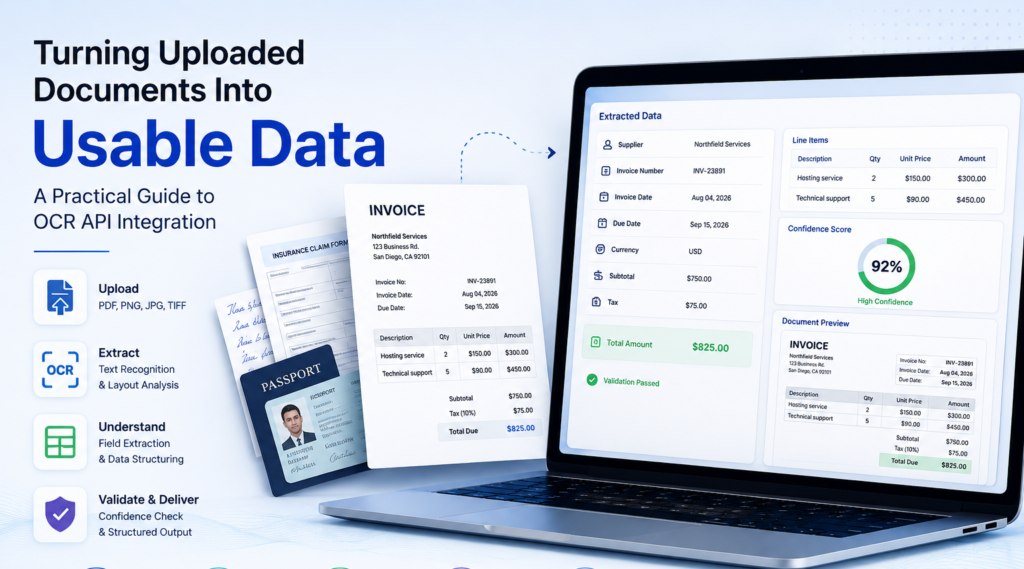
Uploading a PDF is easy. Turning that PDF into data your application can trust is not.
A scanned invoice may contain every detail a finance team needs, yet software still has to identify the supplier, invoice number, tax amount, total, payment terms, and line items correctly. A photographed application form may look readable to a person while containing skewed text, shadows, handwriting, checkboxes, and fields that appear in different positions from one submission to the next.
This is where document capture and OCR tooling becomes more than a text-recognition feature. A production system needs to receive documents safely, improve weak inputs, extract text, understand page structure, identify business fields, check those fields for errors, and deliver normalized data to another application.
The difference between a basic OCR demo and a dependable document-processing workflow is therefore not simply recognition accuracy. It is whether the complete system can produce useful, explainable, and verifiable output under real-world conditions.
For teams working on invoice automation, onboarding, claims processing, healthcare intake, document archives, compliance operations, expense management, or identity workflows, OCR should be treated as one component of a broader data pipeline. The practical goal is not to recognize every word on a page. The goal is to turn messy documents into structured information with known levels of confidence and clear handling for uncertain results.
Understand the Goal and Real Challenges of OCR Integration
The first step in OCR integration is to define the business outcome before choosing a technology provider. Teams often begin by comparing recognition engines, but that can lead to an architecture that reads documents well without producing the specific data the application needs.
If the requirement is searchable PDF text, general OCR may be sufficient. If the system must identify invoice totals, customer names, claim numbers, dates, account references, medical codes, or table rows, the problem becomes more complex.
The most useful question is therefore not, “How accurately can the system read this page?” It is, “Can the system extract the required fields accurately enough for the next workflow?”
Define the Required Output Schema First
A structured schema gives the processing pipeline a measurable target.
For an invoice, the required output may include:
- Supplier name
- Invoice number
- Purchase order number
- Invoice date
- Due date
- Currency
- Subtotal
- Tax
- Total amount
- Line-item descriptions
- Quantities
- Unit prices
For an insurance claim, the schema may contain policy number, claimant name, incident date, claim type, repair estimate, and contact information.
For an identity workflow, the expected values might include legal name, document number, date of birth, issue date, expiration date, and issuing authority.
Defining these values early makes it easier to determine whether the project requires basic OCR, layout analysis, table recognition, handwriting support, key-value extraction, or a specialized document model.
Reliable document capture and OCR tooling should be evaluated against these required outputs rather than against vague claims about overall OCR accuracy.
Expect Real Documents to Be Imperfect
Documents submitted by real users rarely resemble clean benchmark images.
A person may photograph a receipt in poor lighting. A supplier may send a compressed scan. A customer may upload a rotated image. Older archives may contain faded text, stains, stamps, handwritten notes, or low-resolution copies.
Frequent input problems include:
- Motion blur
- Perspective distortion
- Shadows
- Uneven lighting
- Cropped margins
- Low contrast
- Compression artifacts
- Rotated pages
- Small fonts
- Background objects
- Handwriting
- Fold lines
These conditions matter because OCR models depend on the visual quality of the source.
A recognition engine cannot reliably recover characters that are absent from the image. If a number is blurred beyond distinction, preprocessing may help, but no OCR platform can guarantee correct reconstruction.
That limitation should influence product design. High-stakes workflows should always include a way to flag uncertain values instead of forcing a confident answer.
Measure Business Accuracy, Not Only Text Accuracy
OCR metrics can be misleading if they are separated from the business problem.
Suppose a system reads the following correctly:
Subtotal: $3,850.00
Tax: $385.00
Total: $4,235.00
Character recognition may be nearly perfect. However, if the extraction layer maps $3,850.00 into the total field, the workflow still fails.
For this reason, production evaluation should distinguish between several types of accuracy.
Character accuracy measures whether individual characters were recognized correctly.
Word accuracy measures whether complete words were recognized correctly.
Field accuracy measures whether the application assigned the correct value to the correct field.
Document-level accuracy measures whether all required information for a document was extracted successfully.
For most business applications, field accuracy and document-level success are more meaningful than character-level performance alone.
Design a Reliable OCR Processing Pipeline
A dependable OCR architecture should separate processing into stages.
A common production pipeline looks like this:
Upload → Validation → Preprocessing → Classification → OCR → Layout Analysis → Field Extraction → Validation → Human Review → Structured Output
This staged architecture provides several advantages. It makes failures easier to diagnose, allows individual components to be replaced, supports document-specific routing, and provides clearer auditability.
Validate Documents Before Sending Them to OCR
File validation should happen before an OCR request is made.
The application should inspect:
- File type
- File size
- Page count
- Image dimensions
- Encryption status
- Corruption
- Empty pages
- Unsupported encodings
Common formats include PDF, JPEG, PNG, and TIFF. Some workflows also support HEIC or convert office documents into images or PDFs before processing.
Early validation prevents unnecessary API costs and gives users clearer feedback.
For example, a workflow can reject:
- Password-protected PDFs
- Corrupted files
- Files exceeding page limits
- Unsupported image formats
- Empty scans
- Extremely low-resolution images
This is also a security consideration. File upload systems should not assume that every file submitted by a user is safe or correctly formed.
Improve Image Quality Before Recognition
Preprocessing can increase OCR reliability when source documents are weak.
Common operations include:
- Auto-rotation
- Deskewing
- Cropping
- Perspective correction
- Grayscale conversion
- Contrast adjustment
- Noise reduction
- Background cleanup
- Resolution normalization
A photograph taken from an angle, for example, may require perspective correction before lines of text become easier to recognize.
Preprocessing should be tested carefully, however. Excessive sharpening or aggressive thresholding can remove punctuation, decimal points, or thin characters. The correct transformation depends on the document type and original image quality.
Good document capture and OCR tooling should therefore preserve the original file while generating a processed version for recognition. Keeping both versions makes troubleshooting and human review easier.
Classify Documents Before Extraction
Different documents benefit from different processing strategies.
An invoice contains different structures from a passport. A medical claim form differs from a receipt. A handwritten application requires capabilities that may not be necessary for machine-printed contracts.
Classification can identify the document type before the extraction stage.
A routing model might use:
- Visual layout
- Keywords
- File metadata
- Page structure
- Machine-learning classification
- Known sender information
The resulting workflow could look like this:
invoice → invoice extractor
receipt → receipt extractor
identity document → identity extractor
contract → generic OCR + semantic extraction
handwritten form → handwriting-capable OCR
Document routing can improve both accuracy and cost efficiency because expensive or specialized processing is used only when needed.
Preserve Reading Order and Page Coordinates
Plain text often loses information that matters.
Consider a four-column financial statement. If OCR returns every word without its location, the application may not know which amount belongs to which heading.
Layout-aware output should preserve information such as:
- Page number
- Bounding boxes
- Reading order
- Paragraph blocks
- Table cells
- Confidence values
- Detected labels
Coordinates allow the extraction layer to reason about spatial relationships.
For example, a value located directly to the right of the label “Invoice Number” is more likely to represent the invoice number than a similar-looking value in a footer.
This positional evidence is particularly important for forms, invoices, financial statements, shipping documents, and applications.
Extract Structured Fields From Raw Text
Once OCR has produced text and layout metadata, the system must convert that information into business data.
This is the stage where a document becomes usable by a database, accounting platform, CRM, claims system, or internal API.
Extract Key-Value Pairs From Forms
Many documents organize information around labels.
Examples include:
Invoice Number: INV-23891
Customer ID: 491829
Due Date: 09/15/2026
Amount Due: $2,840.50
A robust extraction layer should recognize variations in labels.
An invoice identifier may appear as:
- Invoice Number
- Invoice No.
- Inv #
- Reference
- Document Number
A rigid parser that looks only for one phrase may fail even though the document clearly contains the value.
Layout-aware systems can combine label meaning with proximity, position, font relationships, and expected field formats.
This is more resilient than relying solely on fixed coordinates.
Use Pattern Matching as Supporting Evidence
Regular expressions remain useful for predictable data formats.
They can identify likely:
- Email addresses
- Dates
- Currency amounts
- Postal codes
- Telephone numbers
- Tax identifiers
- Document references
However, pattern matching does not establish meaning by itself.
A string such as 60498122 might be an invoice number, account number, policy number, or customer ID. The surrounding label and location determine its business role.
For this reason, pattern recognition works best when used as one signal among several.
Preserve Table Structure During Extraction
Tables are a common OCR failure point because their meaning depends on row and column alignment.
Consider this invoice section:
| Description | Quantity | Unit Price | Tax | Amount |
|---|---|---|---|---|
| Hosting service | 2 | $150.00 | $30.00 | $330.00 |
| Technical support | 5 | $90.00 | $45.00 | $495.00 |
A text-only OCR response may correctly recognize every number while losing the relationship between the columns.
A layout-aware parser should preserve:
- Table boundaries
- Column headers
- Rows
- Individual cells
- Spanning cells
- Numeric alignment
The system can then transform the table into structured line-item records.
For example:
description = "Technical support"
quantity = 5
unit_price = 90.00
tax = 45.00
amount = 495.00
This structural preservation is essential for financial processing, inventory workflows, statements, purchase orders, and reports.
Add Semantic Extraction Where Layouts Vary
Rule-based extraction works well for consistent documents, but it becomes harder to maintain when hundreds of vendors use different layouts.
A semantic extraction layer can interpret recognized text and map it into a predefined schema.
For example:
{
  "invoice_number": "INV-23891",
  "invoice_date": "2026-08-04",
  "supplier": "Northfield Services",
  "subtotal": 2550.00,
  "tax": 290.50,
  "total": 2840.50,
  "currency": "USD"
}
Language models can be useful for this stage because they can understand field meaning even when labels or formatting vary.
They should not, however, be allowed to invent missing values.
A safe extraction design should require the model to return null, unknown, or a review flag when supporting evidence is absent.
The application should also preserve the source text or coordinates used for each extracted value whenever possible.
That traceability substantially improves trust and debugging.
Validate, Correct, and Deliver the Final Data
Validation is one of the most important parts of a production OCR workflow because plausible-looking output can still be wrong.
A recognized number may have the correct format but represent the wrong field. A decimal point may be missed. A date may be valid but inconsistent with the rest of the document.
Validation helps catch those failures before downstream systems accept the data.
Validate Individual Field Formats
Basic rules can detect obvious errors.
Examples include:
invoice_total >= 0
invoice_date <= processing_date
currency in ["USD", "EUR", "GBP"]
invoice_number != null
A date should parse correctly. A monetary value should be numeric. Required identifiers should not be empty.
Validation logic should be specific to the workflow rather than copied from generic examples.
Check Relationships Between Fields
Cross-field validation can catch errors that simple formatting rules miss.
For an invoice:
subtotal + tax - discount ≈ total
For a purchase order:
quantity × unit price ≈ line total
For an identity document:
expiration date > issue date
For a financial statement:
opening balance + credits - debits ≈ closing balance
These checks provide independent evidence about whether the extraction is internally consistent.
They are especially valuable when OCR confuses similar characters such as 0 and O, 1 and I, or 5 and S.
Use Confidence Scores as One Signal
Many OCR engines return confidence values.
These can help identify uncertain words or fields, but confidence scores should not be interpreted as universal probabilities. Different vendors calculate them differently, and scores from one model may not be directly comparable with another.
A practical workflow might use internally tested thresholds such as:
| Confidence band | Example action |
|---|---|
| High | Accept when validation also passes |
| Medium | Apply additional checks |
| Low | Route important fields for review |
| Very low | Request reprocessing or manual verification |
The exact thresholds should be calibrated against your own documents.
A healthcare intake system, financial workflow, and document-search archive may require very different tolerances.
Build Human Review Into High-Risk Workflows
Human review is often the correct design choice when an error has material consequences.
If an OCR pipeline processes 95 percent of documents automatically and sends 5 percent for manual confirmation, that may still represent a highly efficient system.
A good review interface should display:
- Original document
- Extracted value
- Source location
- Confidence indicator
- Validation warning
- Suggested correction
Reviewers should not be forced to retype the entire document.
They should be able to confirm only the uncertain fields.
Corrections can also be logged and later used to improve extraction rules, test new models, or identify recurring document-quality problems.
Return a Stable Data Schema
Downstream systems should receive consistent output regardless of how the original document was formatted.
For example:
{
  "document_type": "invoice",
  "status": "validated",
  "supplier": {
    "name": "Northfield Services"
  },
  "invoice": {
    "number": "INV-23891",
    "date": "2026-08-04",
    "currency": "USD",
    "subtotal": 2550.00,
    "tax": 290.50,
    "total": 2840.50
  },
  "review_required": false
}
The consumer of this data should not have to understand the OCR vendor’s internal response format.
A normalization layer also makes it easier to change OCR providers later without forcing every downstream system to be rewritten.
Compare OCR Integration Approaches Before Choosing a Workflow
Different document-processing requirements justify different architectures.
| Approach | Best suited for | Main strength | Main limitation |
|---|---|---|---|
| Basic OCR | Searchable PDFs and plain text | Simple to implement | Little layout understanding |
| Layout-aware OCR | Forms, reports, statements | Preserves positions and document structure | Requires additional extraction logic |
| Template extraction | Stable, repeatable document layouts | Precise for known formats | Breaks when layouts change |
| Specialized document models | Invoices, receipts, IDs | Faster structured extraction | May be limited to supported document types |
| OCR plus semantic extraction | Highly variable document formats | Flexible field interpretation | Requires strong validation |
| OCR plus human review | High-risk or regulated workflows | Strong operational reliability | Adds review effort and cost |
No single method is universally best.
A searchable archive may only need plain text recognition. Accounts payable may require table extraction and arithmetic validation. Identity processing may need document-specific models and stricter review. Legal workflows may benefit from layout-aware OCR followed by semantic analysis.
The right document capture and OCR tooling depends on error tolerance, document variety, volume, latency, privacy requirements, processing cost, and the consequences of incorrect data.
Protect Sensitive Documents and Maintain Auditability
OCR systems frequently handle information that users expect to remain confidential.
Documents may contain:
- Names and addresses
- Financial details
- Health information
- Identification numbers
- Signatures
- Customer records
- Contracts
- Internal business data
Security should therefore be part of the initial architecture.
Encrypt Files and Restrict Access
Documents should be protected while being transferred and while stored.
Application permissions should follow least-privilege principles. A service that only needs structured invoice totals should not automatically receive unrestricted access to unrelated document archives.
Teams should also review how external OCR providers process, retain, or use submitted files before sending sensitive documents to them.
Define Explicit Retention Policies
Raw documents should not remain in storage indefinitely simply because no deletion policy was implemented.
Retention may depend on business, legal, contractual, or regulatory obligations.
Some applications may delete the original file after successful processing. Others may retain it for audit purposes.
The important point is that retention should be intentional.
Preserve a Processing Audit Trail
For workflows where extracted values may later be challenged, keep enough metadata to reconstruct how the result was produced.
Useful records include:
- File identifier
- Upload time
- Document type
- OCR provider
- Processor or model version
- Extracted fields
- Confidence values
- Source page
- Bounding boxes
- Validation results
- Reviewer corrections
- Final output
This evidence can significantly reduce troubleshooting time.
It also helps teams distinguish model failures from input-quality problems, extraction-rule mistakes, and human corrections.
Measure OCR Performance With Production-Like Documents
A system should be tested with the same kinds of files users actually submit.
A benchmark containing only clean scans can create unrealistic expectations.
Include difficult cases such as:
- Phone photographs
- Blurry images
- Rotated pages
- Faded scans
- Dense tables
- Unusual templates
- Multi-page PDFs
- Handwriting
- Stamps
- Mixed languages where applicable
Track metrics that reflect the real workflow.
Measure Field Accuracy
For structured data extraction, calculate how often each required field matches the verified ground truth.
Invoice number accuracy may be 99 percent while line-item accuracy is significantly lower. Measuring fields independently makes bottlenecks visible.
Measure Document-Level Success
A document can contain ten correctly extracted fields and one critical error.
Depending on the workflow, that document may still require review.
Document-level success therefore answers a more useful question: how often can the application complete the entire document without intervention?
Measure Straight-Through Processing
Straight-through processing measures the proportion of documents that reach the final workflow without human review.
This metric is useful because it connects technical performance with operational efficiency.
A model with slightly higher field accuracy may provide much greater business value if it substantially reduces manual review.
Design Explicit Failure Paths
No OCR implementation is perfect.
A mature system defines what happens when recognition fails instead of assuming every document will succeed.
Possible fallback actions include:
- Re-run preprocessing
- Retry with another OCR model
- Route to a specialized extractor
- Ask the user for a clearer upload
- Require field confirmation
- Send the document to manual review
The system should never silently treat uncertain data as verified.
A structured response might look like:
{
  "status": "review_required",
  "field": "invoice_total",
  "reason": "validation_failed",
  "confidence": 0.63
}
This approach allows downstream systems to respond safely.
Reliable document capture and OCR tooling does not promise that every document will be read perfectly. It provides predictable behavior when the system cannot determine an answer with sufficient confidence.
Frequently Asked Questions About Document Capture and OCR Tooling
How does an OCR API convert an uploaded document into structured data?
An OCR API recognizes visible text from a PDF or image. A separate extraction layer then uses labels, layout positions, rules, specialized document models, or semantic processing to map that text into fields such as names, dates, totals, addresses, and line items. Validation should occur before the values are passed to another system.
Is OCR alone enough for invoice automation?
Usually not. OCR identifies text, while invoice automation also requires document classification, field mapping, table extraction, validation, exception handling, and structured delivery. Reliable systems combine these stages rather than treating OCR as the complete solution.
How can teams improve OCR accuracy?
Start with better input quality, correct page rotation and perspective, preserve layout information, choose a model suited to the document type, and validate extracted fields. Production testing should include poor-quality files rather than only clean sample documents.
Should developers use templates or AI-based extraction?
Templates are effective when documents have stable layouts. AI-based or semantic extraction is more flexible when suppliers, customers, or document types vary. Many mature systems combine deterministic rules with model-based extraction so that predictable fields remain tightly controlled while unusual layouts can still be interpreted.
How should low-confidence OCR results be handled?
Do not automatically commit important low-confidence values to downstream systems. Validate them against field rules and related values. If uncertainty remains, reprocess the document, request another upload, or send the field to a human reviewer.
Turn Document Recognition Into Trusted Business Data
The most effective OCR implementation is not the one that recognizes the largest number of words. It is the one that consistently delivers the correct business information, identifies uncertainty, and provides evidence for how each important value was obtained.
Start with the required data schema. Validate every upload. Improve weak images without discarding the original. Preserve page positions and reading order. Route different document types to appropriate extraction methods. Validate important values using formatting rules, arithmetic checks, cross-field relationships, and confidence signals.
Then design the system for the cases that do not work perfectly.
That means providing human review where the cost of an error is high, keeping an audit trail, protecting sensitive documents, measuring performance against real submissions, and returning a stable schema to downstream applications.
This is the practical value of modern document capture and OCR tooling. OCR converts visual content into machine-readable text, but a trustworthy processing pipeline converts that text into usable data.
If you are building a workflow around invoices, receipts, applications, statements, identity documents, contracts, or uploaded PDFs, evaluate OCR technology as part of the complete system rather than as an isolated API. Prioritize traceability, validation, security, and measurable field accuracy. Those are the capabilities that turn document automation from an impressive demo into infrastructure your business can depend on.